
How to Find the CSOT Part Number on Your Laptop Screen
How to Find the CSOT Part Number on Your Laptop Screen
When you are replacing a laptop screen made by CSOT (China Star Optoelectronics Technology), the Part Number is the most important detail. It tells you the exact model, version, and production information of the display so you can order the correct replacement without guesswork.
CSOT uses a standardized label design. Once you know how to read it, identifying the part number is simple.
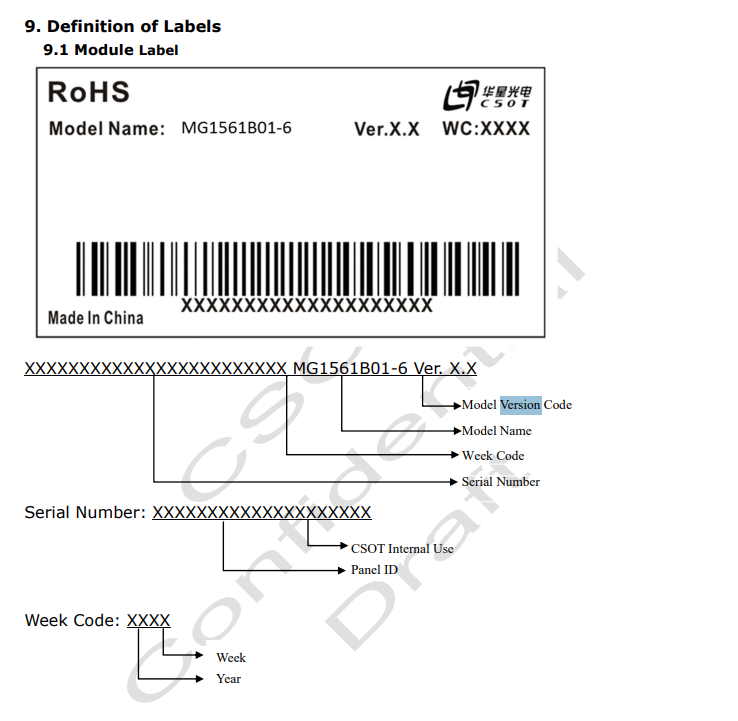
Example CSOT module label. Look for the model name in this area.
1) Identify the CSOT Part Number (Model Name)
The Model Name is usually formatted like:
This number tells you:
- MG -> CSOT model prefix
- 1561 / 2515 -> Series or size family
- B01 / B04 -> Sub-model
- -6 / -3 -> Version
Use this number when ordering a replacement screen.
2) Find the Version Code (Ver. X.X)
Next to the part number, you will see a version such as Ver. 1.2, Ver. 2.0, or Ver. 0.3.
Important: Some models have multiple versions, and mixing versions can cause compatibility issues in certain laptops. Always match the version if possible.
3) Locate the Week Code (WC: XXXX)
You will also see something like WC: 2145 or WC: 1927.
This is the manufacturing date, broken down as:
- 21 -> Year (2021)
- 45 -> Week number of the year
This code is not required for ordering but is helpful for authenticity and batch tracking.
4) Understanding the Serial Number Section
Below the barcode is a longer sequence of numbers and letters. This is not the part number; it is the serial number used by the manufacturer for internal tracking.
The serial number includes the CSOT internal ID, panel ID, and production sequence. Good to know, but not used for ordering.
Putting It All Together
- Model Name / Part Number: MG1561B01-6 -> This is what you need.
- Version: Ver. X.X -> Match if possible.
- Week Code: Production date reference.
- Serial Number: Internal manufacturing data.
Why Knowing the Part Number Matters
Laptops often use multiple compatible screens from different manufacturers. Even CSOT alone may produce several versions of the same model.
- Ensures correct resolution and connector location.
- Confirms pin count and backlight type.
- Eliminates guesswork, returns, and downtime.
More Technical Reference
For deeper details, labeling standards, and part definition, refer to the official CSOT documentation.
Need help identifying your CSOT screen?
Send us a picture of your label and we will match the correct part number for you quickly and accurately.
Email Us