

Acer TRAVELMATE SPIN P4 TMP414RN-53-735U 14.0" 1920x1200 FHD Touch Screen Assembly

Request Bulk Quote Are you tax exempt? Display Tech Support Shipping from USA
- SKU:
- B143764-3505
- Condition:
- New
- Availability:
- Inquire
- Shipping:
- Real-time Shipping Charges
 International Shipping






To see a printable version of listed Display click here
Description
Order Pre-Verification Strongly Recommended.Does it ✓ FIT your system? [Use our Pre Verification help.]
|
- Brand: Touch Screen Assembly-No Bezel
- Size: 14.0"

- Resolution: FHD+ WUXGA
- Pixels: 1920 x 1200
- Backlight Type: LED
- Backlight Lamp: DIODE
- Connector: Reverse Uppa
- Pin Connection: 30 Pins
- Side: Bottom Right
- Frame: Micro Edge
- Condition: NEW
- Commodity: Touch Screen Assembly-No Bezel
- Technology: Touch
- Dead Pixel Policy: In Accordance with ISO 13406-2 norm.
- Source: Factory Direct
- Packaging: Fragile Customized Package
- Compatibility: OEM
- Warranty Information: Covered by 30-day replacement warranty.
Nv140wum-n41
Acer 6m.b20n7.001
edid BOE081D
NV140FHM-N48
KL.1400D.027, KL.1400D.033, KL.1400E.009, KL.14005.039, KL.14008.017, KL.14008.019, KL.CB514.2HX, KL.0C933.SV1
6M.VP5N8.001
Acer TravelMate Spin P4 - TMP414RN
Acer TRAVELMATE TMP414RN-53G
Acer TRAVELMATE TMP414RN-53-TCO
N22Q24
Assembly Fitment Tip
If your assembly doesn t seem to align or reach properly, it s likely because the back bezel is fully opened in an L shape. To fit it correctly, partially close it into a V shape this brings the assembly closer and allows it to align with the connectors and frame properly.
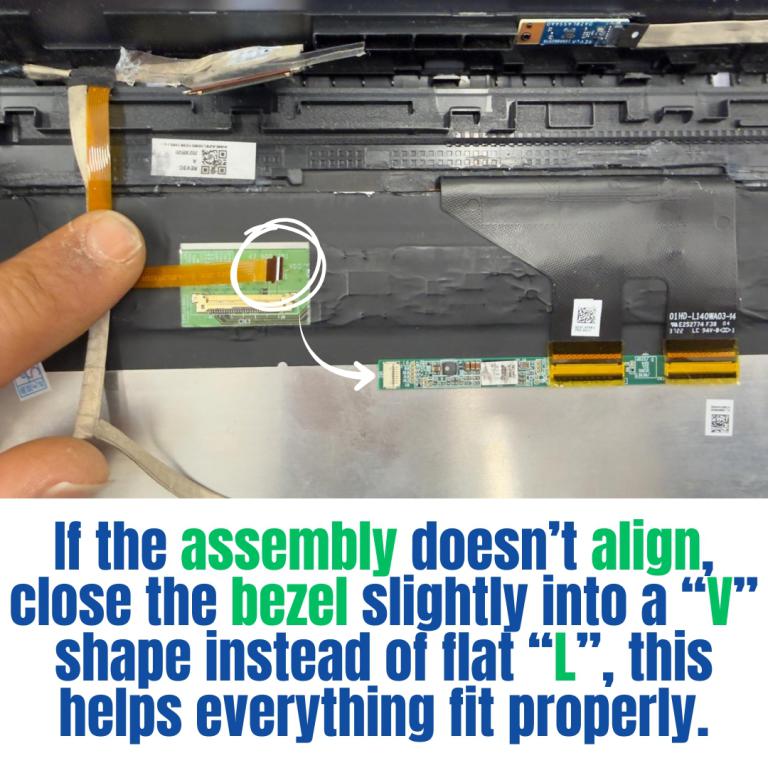
Think of it like a book
- Opened flat ( L shape): The distance between the parts is greater.
- Slightly closed ( V shape): Everything lines up perfectly.
Display Without Bezel Casing & Digitizer Board
This listed display comes without the bezel casing and digitizer board. Installation requires proper tools to carefully remove the existing digitizer board and bezel casing from your old screen and transfer them to the new display. Its recommended that this process be done by a senior technician for the best results.
You may refer to the video here.
Videos
View AllClose
Display Upgrade - Downgrade Experiments
Considering upgrading your existing screen (e.g., 60Hz → 144Hz, FHD → QHD or 4K)?
While some upgrades are possible, they come with compatibility risks — even if the connector matches.
At Bliss Computers, we can help by checking connector compatibility (if in stock) and sharing any known upgrade history.
Do I Need a New Screen?
Related Products
Related Products


Acer TRAVELMATE SPIN P4 TMP414RN-53-735U FHD+ 1920x1200 IPS Touch Screen Display


Acer TRAVELMATE SPIN P4 TMP414RN-53-564W 14.0" 1920x1200 FHD Touch Screen Assembly


Acer TRAVELMATE SPIN P4 TMP414RN-53-79LG 14.0" 1920x1200 FHD Touch Screen Assembly


Acer TRAVELMATE SPIN P4 TMP414RN-53-78CU 14.0" 1920x1200 FHD Touch Screen Assembly

