

Dell 7PTRX: Assembly LCD TSP 13.0 3K2K BOE TPK Screen

Request Bulk Quote Are you tax exempt? Display Tech Support Shipping from USA
- SKU:
- B1170375-3700
- Condition:
- New
- Availability:
- In stock ready to ship from Union City, NJ USA
- Shipping:
- Real-time Shipping Charges
 International Shipping
- Looking for Local Pick-Up - Print this Pick-Up Slip






Description
Order Pre-Verification Strongly Recommended.Does it ✓ FIT your system? [Use our Pre Verification help.]
|
- Brand: Touch Screen Assembly-No Bezel
- Size: 13.0"

- Pixels: 2880 x 1920
- Backlight Type: LED
- Backlight Lamp: DIODE
- Side: Bottom Right
- Finish: Transparent
- Condition: NEW
- Commodity: Touch Screen Assembly-No Bezel
- Technology: Detachable, IPS 3K, Touch
- Dead Pixel Policy: In Accordance with ISO 13406-2 norm.
- Source: Factory Direct
- Packaging: Fragile Customized Package
- Compatibility: OEM
- Warranty Information: Covered by 30-day replacement warranty.
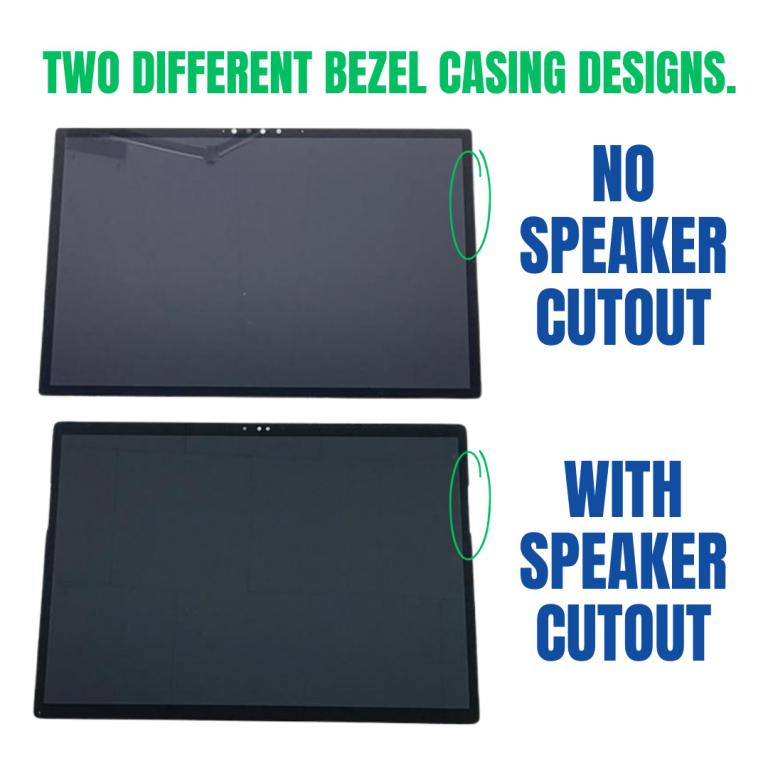
Why Some Versions Have Speaker Cutouts and Some Don t
Dell produced the XPS 13 9315 / Latitude 13 7350 with two different bezel styles depending on speaker placement, vendor variations, and frame design.
1 Whether the laptop has Edge Speaker acoustics
Certain configurations include side-firing speakers that sit extremely close to the edge of the LCD assembly. To prevent muffling and optimize acoustics, Dell designed a cutout on the glass bezel around the speaker area.
These units require a screen with cutouts.
2 Models without side-edge speakers
- Down-firing speakers (bottom chassis)
- Different speaker chamber layout
- Different frame/bracket positioning
These do not need the edge relief in the bezel, so Dell uses a fully enclosed front glass with no cutout.
These units use the no cutout version.
3 Dell s multiple part vendors = multiple bezel styles
Dell sources screens from:
Each vendor produces the assembly with slight variations, and Dell approves multiple compatible part numbers. Some vendors supplied units with cutouts, others without both are considered OEM-correct.
4 Both versions fit but must match your bezel frame
Even though the LCD panel itself is the same, the front glass digitizer frame differs.
If you install a cutout bezel on a model that expects no cutout, you ll see a cosmetic gap.
If you install a no-cutout bezel on a model that needs the speaker relief, the frame may sit tight or press against the speaker area.
This is why Bliss Computers separates listings into:
How to know which one you need
Display Without Bezel Casing & Digitizer Board
This listed display comes without the bezel casing and digitizer board. Installation requires proper tools to carefully remove the existing digitizer board and bezel casing from your old screen and transfer them to the new display. Its recommended that this process be done by a senior technician for the best results.
You may refer to the video here.
Videos
View AllClose
Display Upgrade - Downgrade Experiments
Considering upgrading your existing screen (e.g., 60Hz → 144Hz, FHD → QHD or 4K)?
While some upgrades are possible, they come with compatibility risks — even if the connector matches.
At Bliss Computers, we can help by checking connector compatibility (if in stock) and sharing any known upgrade history.
Do I Need a New Screen?
Related Products
Related Products


Dell Nvk9m Assembly Lcd 13.4" Tsp Tpk Sdc Screen 4k4d1


Dell 6RDG9 H9WCD Assembly LCD 15.6" TSP SDC TPK Screen


C9JNW Assembly LCD 13.3" FHD TSP TPK AUO Dell Screen


Dell X5N9J Assembly LCD 13.4" TSP OLED TPK SDC Screen

