

FJNCT I77107952 Dell Assembly LCD FHD Touch TPK LG 27 ADL LCD

Request Bulk Quote Are you tax exempt? Display Tech Support Shipping from USA
- SKU:
- B424029-3102
- Condition:
- New
- Availability:
- In stock ready to ship from Union City, NJ USA
- Shipping:
- Real-time Shipping Charges
 International Shipping
- Looking for Local Pick-Up - Print this Pick-Up Slip









To see a printable version of listed Display click here
Description
Order Pre-Verification Strongly Recommended.Does it ✓ FIT your system? [Use our Pre Verification help.]
|
- Brand: Touch Screen Assembly
- Size: 27"

- Resolution: Full HD
- Pixels: 1920 x 1080
- Backlight Type: LED
- Backlight Lamp: DIODE
- Frame: Borderless
- Finish: Matte/Glossy write in checkout note. Avoid RMA Fees.
- Condition: NEW
- Refresh Rate: 60Hz
- Commodity: Touch Screen Assembly
- Technology: IPS, Touch
- Dead Pixel Policy: In Accordance with ISO 13406-2 norm.
- Source: Factory Direct
- Packaging: Fragile Customized Package
- Compatibility: OEM
- Warranty Information: Covered by 30-day replacement warranty.
MV270FHM-N42
LM270WF7(SS)(F2), MV238FHM-N42
RYV1X
FN43P
0FN43P
1NY87
LM270WF7-SSF2
0FJNCT
KKMVX MOD, CHAS, I7D, T, M. IR, 7710W, M2C
PFD01: ASSY, CHAS, L6, I7D, T, M, IR, W, 7710
LM270WF7(SS)(F2)
0RYV1X
MV270FHM-N42 B4
321-BEQQ
7WXHW
Chassis Y77PC WDYTV
5J01R
FCV5R
ST270SM022AKF-02X
MV0NT
C8K55
FFPYX
Dell 0fn43p
Dell RYV1X
Dell 0RYV1X
Dell FN43P
Dell P/N 0RYV1X
Dell 1NY87
Dell FJNCT
Dell 0FJNCT
Dell 321-BEQQ
Dell Inspiron 27 7720
Dell Inspiron 27 7730
Dell AIO Display I7710-79
Dell Inspiron 27 i7710
I77107952
LCD Part Number: FN43P, 0FN43PM, RYV1X, 0RYV1X, LM270WF7(SS)(F2), MV238FHM-N42.
Digitizer Board Part Number: 73XCW, 073XCW, DPG7V, 0DPG7V.
Digitizer Flex: 5GPVM,
Title - DELL 27
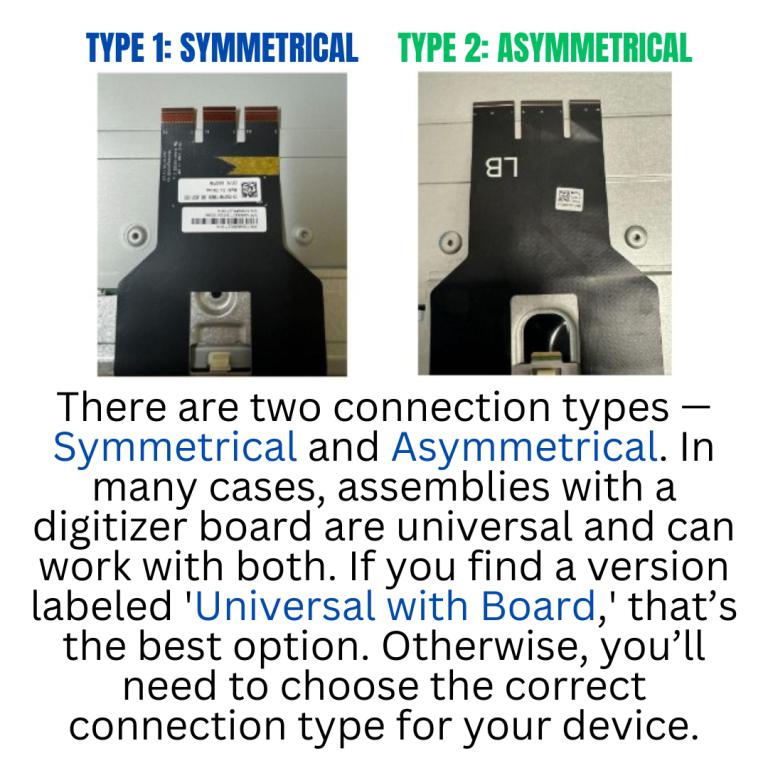
Understanding Connection Types
When replacing or buying a new screen assembly, it s important to know that there are two types of connections:
- Symmetrical Both connectors are aligned evenly.
- Asymmetrical Connectors are offset or unevenly placed.
Videos
View AllClose
Display Upgrade - Downgrade Experiments
Considering upgrading your existing screen (e.g., 60Hz → 144Hz, FHD → QHD or 4K)?
While some upgrades are possible, they come with compatibility risks — even if the connector matches.
At Bliss Computers, we can help by checking connector compatibility (if in stock) and sharing any known upgrade history.
Do I Need a New Screen?
Related Products
Related Products


FJNCT Dell I77107952 Assembly LCD FHD Touch TPK LG 27 ADL LCD Display LCD LED Monitor Panel

Fjnct Lcd Assembly FHD Touch Tpk Lg 27 Adl

Fjnct Rb Lcd Assembly FHD Touch Tpk Lg 27 Adl


FJNCT LCD Assembly FHD Touch TPK LG 27 ADL Dell Inspiron 27 i7710-7952WHT-PU

