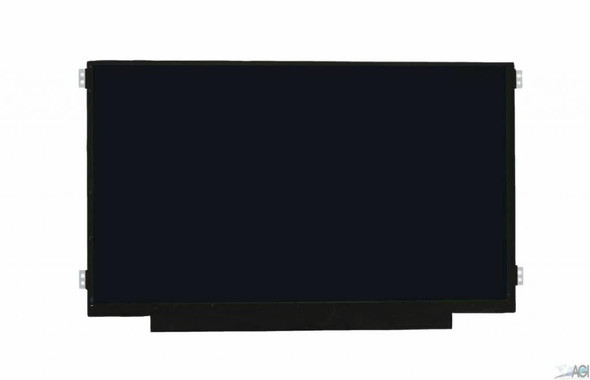
11.6" Dell Inspiron 3195 HD LCD Display Touch Screen Digitizer Assembly Frame

Request Bulk Quote Are you tax exempt? Display Tech Support Shipping from USA
- SKU:
- B214661-1158
- Condition:
- New
- Availability:
- Inquire
- Shipping:
- Real-time Shipping Charges
 International Shipping







To see a printable version of listed Display click here
Description
Order Pre-Verification Strongly Recommended.Does it ✓ FIT your system? [Use our Pre Verification help.]
|
- Size: 11.6"

- Resolution: WXGA HD
- Pixels: 1366 x 768
- Backlight Type: LED
- Backlight Lamp: DIODE
- Connector: EDP
- Pin Connection: 40 Pins
- Side: Bottom Right
- Finish: Transparent
- Condition: NEW
- Commodity: Touch Screen Assembly-No Bezel
- Technology: 2-in-1, Touch
- Dead Pixel Policy: In Accordance with ISO 13406-2 norm.
- Source: Factory Direct
- Packaging: Fragile Customized Package
- Compatibility: OEM
- Warranty Information: Covered by 30-day replacement warranty.
Dell WJ53J
Dell 0WJ53J
Dell HCRV9
Dell 4D1J2
Dell HYWH4
Dell 0HYWH4
Dell 0HCRV9
Dell P14WK Dell 0P14WK
Dell 03px21
Dell 003px21
Dell F2GV0 Dell 0F2GV0
Dell 4D1J2 04D1J2 Dell P08HC 0P08HC Dell G7TKC 0G7TKC Dell MJY38 0MJY38 Dell 0NDYN 00NDYN Dell M6NTY 0M6NTY Dell 529JX 0529JX NT116WHM-A11 Dell HCRV9 0HCRV9 Dell 67D7N 067D7N Dell 529JX 0529JX Dell 8YJ02 08YJ02 Dell MJ1K5 0MJ1K5 Dell P08HC 0P08HC Dell 5KW0K 05KW0K Dell 0T3DW 00T3DW Dell G7TKC 0G7TKC Dell 0NDYN 00NDYN B116XTB01.0 Dell P14WK Dell 0P14WK
nt116whm-n31
Dell 4D1J2 04D1J2 Dell P08HC 0P08HC Dell G7TKC 0G7TKC Dell MJY38 0MJY38 Dell 0NDYN 00NDYN Dell M6NTY 0M6NTY Dell 529JX 0529JX NT116WHM-A11 Dell HCRV9 0HCRV9 Dell 67D7N 067D7N Dell 529JX 0529JX Dell 8YJ02 08YJ02 Dell MJ1K5 0MJ1K5 Dell P08HC 0P08HC Dell 5KW0K 05KW0K Dell 0T3DW 00T3DW Dell G7TKC 0G7TKC Dell 0NDYN 00NDYN B116XTB01.0
Dell HCRV9
Dell 0HCRV9
Dell WJ53J
Dell 0WJ53J
Dell 4D1J2
Dell HYWH4
Dell 0HYWH4
Dell P14WK Dell 0P14WK
Dell 03px21
Dell 003px21
Dell F2GV0 Dell 0F2GV0
Dell Inspiron 11 3169
Dell Inspiron 11 3185
Dell Inspiron 11 3179
Dell Inspiron 11-3179 Dell Inspiron 3195 Dell Inspiron P32T Dell Inspiron 11-3185 Dell Inspiron 11-3168 Dell Inspiron 11-3169 Dell Inspiron 11 P25T Dell Inspiron 3000 P25T001 Dell Inspiron 3000 P25T002
Dell Inspiron 11-3195 2-In-1
Dell Inspiron 3168 3169 P25T
Display Without Bezel Casing & Digitizer Board
This listed display comes without the bezel casing and digitizer board. Installation requires proper tools to carefully remove the existing digitizer board and bezel casing from your old screen and transfer them to the new display. Its recommended that this process be done by a senior technician for the best results.
You may refer to the video here.
Display Upgrade - Downgrade Experiments
Considering upgrading your existing screen (e.g., 60Hz → 144Hz, FHD → QHD or 4K)?
While some upgrades are possible, they come with compatibility risks — even if the connector matches.
At Bliss Computers, we can help by checking connector compatibility (if in stock) and sharing any known upgrade history.
Do I Need a New Screen?
Related Products
Related Products


11.6" HD 1366x768 LCD Display Touch Screen Assembly Frame Dell Inspiron 3195