
Razer Blade 15 Advanced RZ09-03305E53 15.6" 3840x2160 40 Pin OLED AMOLED Touch Screen Assembly

Request Bulk Quote Are you tax exempt? Display Tech Support Shipping from USA
- SKU:
- B1236161-3524
- Condition:
- New
- Availability:
- In stock ready to ship from Union City, NJ USA
- Shipping:
- Real-time Shipping Charges
 International Shipping
- Looking for Local Pick-Up - Print this Pick-Up Slip








To see a printable version of listed Display click here
Description
- Size: 15.6"

- Resolution: UHD
- Pixels: 3840 x 2160
- Backlight Type: OLED
- Backlight Lamp: DIODE
- Pin Connection: 40 Pins
- Side: Bottom Right
- Finish: Transparent
- Condition: NEW
- Commodity: Touch Screen Assembly
- Technology: AMOLED, OLED, Touch
- Dead Pixel Policy: In Accordance with ISO 13406-2 norm.
- Source: Factory Direct
- Packaging: Fragile Customized Package
- Compatibility: OEM
- Warranty Information: Covered by 30-day replacement warranty.
SDC4143
ATNA56WR07-0
FP-ST156SM091BKF-02X
FP-ST156SM091BKF
FP-ST156SM091AKF
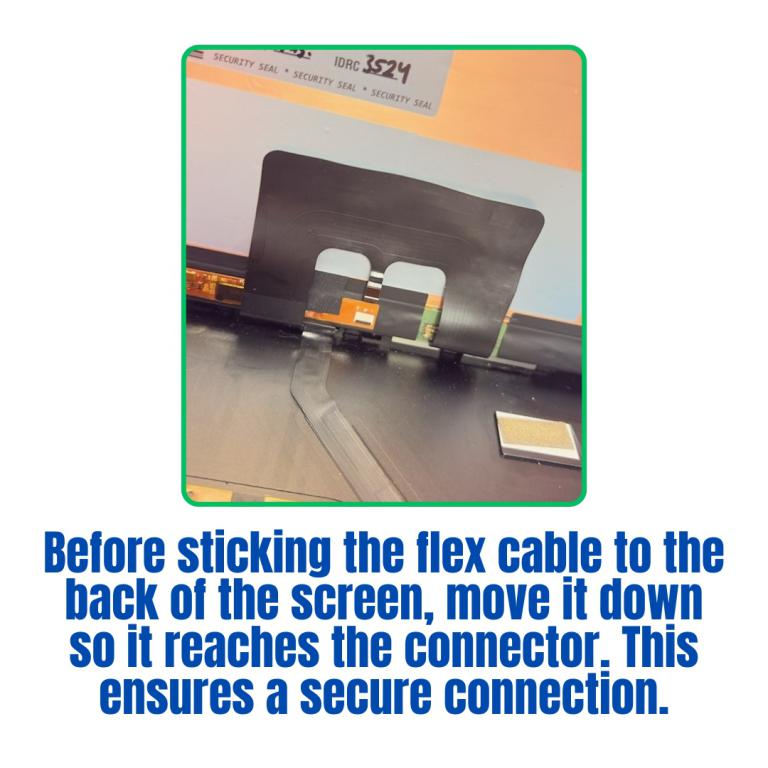
Flex Cable Installation Instructions
Positioning the Cable
Before attaching the flex cable to the back of the screen, carefully move the cable downward so that it lines up with the connector.
Aligning with the Connector
Make sure the cable reaches the connector fully. If it s not aligned correctly, the connection may be loose or unstable.Securing the Connection
Once the cable is properly seated in the connector, gently press it in place to ensure a firm and secure fit.Adhering the Cable
Only after confirming the connection is secure should you adhere the flex cable to the back of the screen. This prevents strain or pulling that could damage the connection.Videos
View AllClose
Display Upgrade - Downgrade Experiments
Considering upgrading your existing screen (e.g., 60Hz → 144Hz, FHD → QHD or 4K)?
While some upgrades are possible, they come with compatibility risks — even if the connector matches.
At Bliss Computers, we can help by checking connector compatibility (if in stock) and sharing any known upgrade history.
Do I Need a New Screen?
Related Products
Related Products

